
What Is The Best AI For Coding? 2026 Architect’s Choice
As of 2026, the best AI for coding is Cursor paired with the Claude 4.5 Sonnet model. This setup dominates due to its Composer feature, enabling autonomous multi-file refactoring and deep codebase indexing.
For a high-performance free alternative, DeepSeek-Coder-V3 is the premier open-weight choice for local and cloud environments.
What is the best AI for coding right now?
I’ve watched the market flip in 2026; we’ve moved past simple chat boxes into what we now call Agentic IDEs. Tools like Cursor and Windsurf don’t just suggest code, they actually inhabit your workflow, monitoring terminals and mapping entire repository architectures to fix bugs before you even hit save.
While GitHub Copilot remains the enterprise security standard, Cursor is the top choice for individual speed and complex, multi-file feature shipping.
How AI evolved from suggesting lines to managing entire folders?
In my experience, the Tab-to-complete era is dead. Today, context is the new intelligence. The most effective AI isn’t the one with the most parameters; it’s the one that can see your local schema, documentation, and pull requests simultaneously to provide architecturally sound logic rather than just syntax.
I’ve lost count of how many times a high-end model has choked mid-stream on a large file. It usually manifests as that dreaded unexpected end of JSON input, a reminder that without local context indexing, even the ‘smartest’ AI is effectively flying blind.
The Right Tool for Your Stack
Different domains have unique architectural gotchas. In my experience, a model that is a genius at React might completely fail at the memory management constraints of an IoT device. To help you pick, I’ve mapped the 2026 market to specific developer personas based on where these tools actually excel in production.

12 Best AI Models and Tools for Professionals
Performance in a lab means nothing if the latency kills your flow. In a production environment, a ‘brilliant’ model that makes you wait 30 seconds is a liability. Here is the ‘ground truth’ on how these tools actually feel when you’re on a deadline.
1. Cursor
I’ve spent the most time in Cursor lately. It’s a fork of VS Code, so it feels familiar, but the Composer feature is the real game-changer. You can literally tell it to refactor an entire auth flow, and it scans every relevant file to make the change.
- The Good: It understands your whole project, not just the file you’re looking at.
- The Bad: It’s a resource hog; your laptop fans will definitely let you know it’s running.
- The Verdict: Best for full-stack devs tired of copy-pasting code.
- Pricing: Free tier available; Pro is $20/mo.
2. Windsurf
Windsurf (from the Codeium team) is for those who want the AI to actually do the work rather than just talk about it. Its Cascade agent is the standout; it doesn’t just suggest code; it jumps into your terminal, runs a test, sees it failed, and iterates on a fix while you watch.
- The Good: Incredible autonomy; it’s the closest thing we have to a self-sufficient junior developer in 2026.
- The Bad: It can be a bit trigger-happy with file changes; you’ll need to keep a close eye on your git diffs.
- The Verdict: Best for senior engineers who want to automate the boring parts of execution and debugging.
- Pricing: Free for individuals; Pro is $15/mo.
3. Claude 4.5 Sonnet
When I’m stuck on a complex logic problem, like a nasty recursive function or a strange architectural bottleneck—I go to Claude. In 2026, it still feels the most human in how it reasons through a problem without getting lost in the weeds.
- The Good: It rarely hallucinates compared to its peers and follows strict architectural patterns flawlessly.
- The Bad: It’s strictly a model; to use it effectively, you usually need to plug it into an IDE like Cursor via API.
- The Verdict: The undisputed king for complex logic and architectural Sanity Checks.
- Pricing: $20/mo via Claude Pro or pay-per-token via API.

4. GPT-5.2 Codex
OpenAI’s flagship hasn’t lost its crown in the Python world. For data science or writing quick automation scripts, GPT-5.2 is consistently the most reliable, appearing to have the widest knowledge of obscure third-party libraries.
- The Good: Massive ecosystem support; if a library exists, GPT has likely been trained on its entire history.
- The Bad: It can get lazy in 2026, occasionally giving you truncated snippets instead of full, working files.
- The Verdict: The premier choice for Pythonistas and Data Scientists.
- Pricing: Included in ChatGPT Plus ($20/mo).
5. GitHub Copilot
If you work at a bank or a massive tech firm, you’re likely using Copilot. It’s the Old Guard of AI coding, reliable, steady, and built with the enterprise-grade security protocols that IT departments demand.
- The Good: Rock-solid security and seamless integration with GitHub Actions and the Microsoft ecosystem.
- The Bad: It feels a bit stuck in 2024 compared to Cursor; it lacks deep, agentic multi-file power.
- The Verdict: Copilot remains the gold standard for secure, corporate environments, particularly for teams following the CISA Guidelines for Secure AI System Development. It is the primary choice for those who need to maintain strict security compliance while integrating AI into the Microsoft ecosystem.
- Pricing: $10/mo for individuals; Enterprise tiers vary.
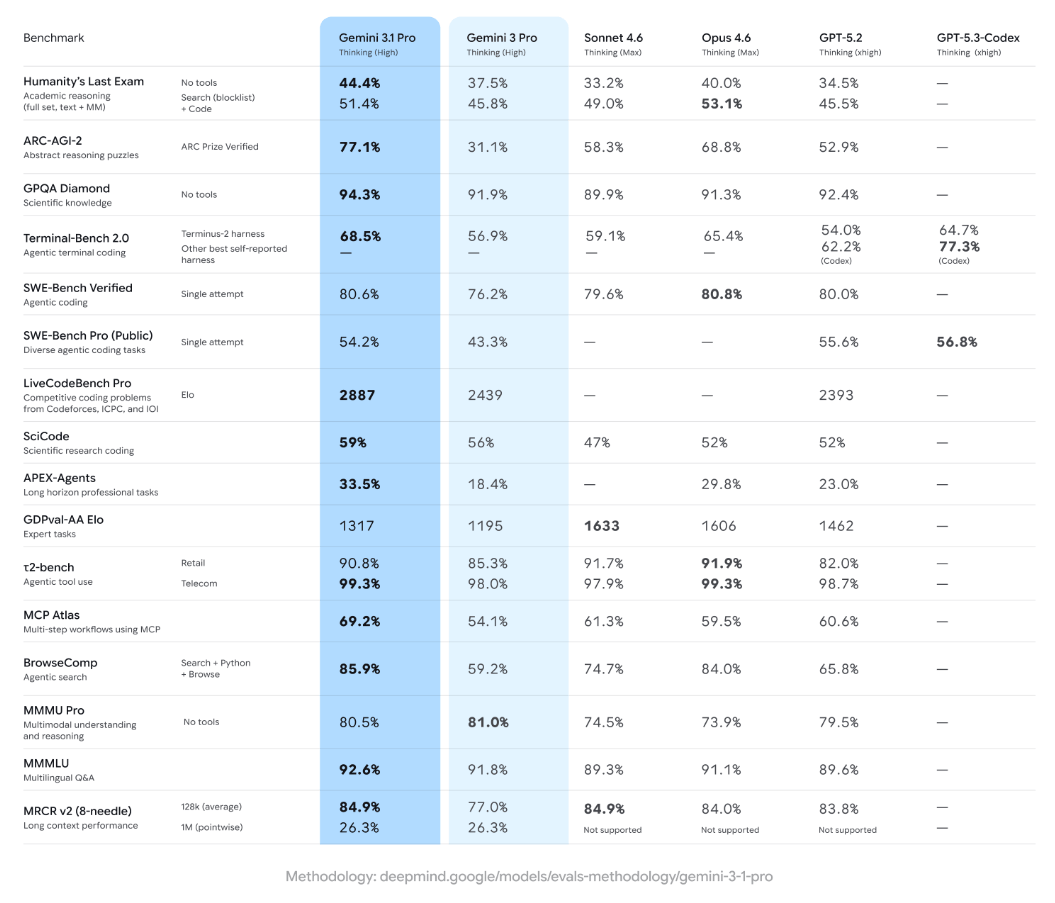
6. Gemini 3.1 Pro
When I’m handed a massive, undocumented 10-year-old codebase, I immediately reach for Gemini. Its 2-million-token window is a lifesaver; you can feed it the entire repository and ask, Where is the legacy auth handled? and it actually knows.
- The Good: Unbeatable context window; it can read an entire project’s documentation in seconds.
- The Bad: The actual code quality can be slightly less creative or elegant than Claude 4.5.
- The Verdict: Essential for legacy migrations and massive documentation tasks.
- Pricing: Generous Free Tier (Google AI Studio); Paid tiers based on token usage.
7. Replit Agent
If you have a SaaS idea on a Friday night, Replit Agent can have a functional MVP live by Saturday morning. It’s a fully managed experience that handles the environment, the database, and the hosting for you.
- The Good: Zero configuration; it handles all the plumbing of deployment through simple chat.
- The Bad: You’re locked into Replit’s cloud; ejecting your code to your own server later can be a headache.
- The Verdict: Best for solo founders and hobbyists wanting to ship at lightning speed.
- Pricing: $25/mo for the Core plan.
8. DeepSeek-Coder-V3
DeepSeek is the primary reason many developers are cancelling their expensive subscriptions. It’s an open-weight model that performs at a near-elite level while being significantly more cost-effective.
- The Good: High privacy; you can run it on your own hardware to keep your code off the public cloud.
- The Bad: Requires some technical know-how to set up locally via Ollama or similar tools.
- The Verdict: The best choice for the privacy-conscious or budget-strapped developer.
- Pricing: Free for local use; extremely low API costs.
9. Blackbox AI
Most AIs are trained on data that is months old. Blackbox is different because it searches the live web as it codes. If a framework released a new version this morning, Blackbox is the only one that won’t give you deprecated code.
- The Good: Real-time web integration ensures your libraries and dependencies are always current.
- The Bad: The user interface can feel a bit cluttered and busy compared to the clean look of Cursor.
- The Verdict: Best for frontend developers living on the Bleeding Edge.
- Pricing: Free tier available; Pro is $9.99/mo.
10. Tabnine
Tabnine has stayed relevant by focusing entirely on local privacy. It doesn’t try to be an autonomous agent; it lives in your IDE and suggests the next line of code without ever sending a single byte to the cloud.
- The Good: 100% private and works perfectly offline; zero risk of data leaks.
- The Bad: Logic isn’t as smart as the massive cloud-connected models like Claude or GPT.
- The Verdict: The only viable option for developers in high-security (Defense/Health) roles.
- Pricing: $12/mo per user for Pro.
11. Codeium
If you’re a student or a hobbyist who can’t justify $200 a year for an AI, Codeium is your best friend. Their free tier isn’t just a trial—it’s a genuinely powerful tool that rivals paid competitors.
- The Good: Ultra-fast autocomplete and support for over 70 programming languages for free.
- The Bad: The most powerful agentic features are locked behind the paid Team tiers.
- The Verdict: The best no-brainer choice for anyone just starting their coding journey.
- Pricing: Free for individuals; Teams at $12/mo.
12. Supermaven
Some AIs feel like they are thinking; Supermaven feels like it’s typing with you. It’s famous for having almost zero latency and a 1-million-token fast context that makes suggestions feel instant.
- The Good: The fastest autocomplete in the industry; it never breaks your flow with loading states.
- The Bad: It’s a specialist tool, great at finishing your sentences, but less capable of architectural planning.
- The Verdict: Best for high-velocity coders who primarily want to crush boilerplate.
- Pricing: Free tier; Pro is $10/mo.
My Personal Take: If you have $20 to spend, get Cursor. It’s the only tool that fundamentally changed how I write software. If you’re broke but have a decent GPU, run DeepSeek. Everything else is a niche, but a very useful one, depending on your job.
Comparison of Top AI Coding Tools 2026
| Tool | Primary Strength | Ideal User | Pricing Model |
| Cursor | Multi-file Edits | Full-stack Devs | $20/mo (Pro) |
| Windsurf | Agent Autonomy | Senior Architects | $15/mo (Pro) |
| GitHub Copilot | Ecosystem/SSO | Enterprise Teams | $10/mo (Indiv) |
| Replit Agent | Rapid MVP | Solo Founders | $25/mo (Core) |
| DeepSeek V3 | Cost Efficiency | Local/Open Source | Pay-per-token |
| v0.dev | UI Generation | Frontend Devs | Freemium |
Finding your AI match by developer persona
There is no ‘one size fits all’ in 2026. A model that writes flawless React components might completely overlook the memory constraints of an embedded IoT device. I’ve spent the last year stress-testing these stacks to see which ones actually hold up in specific niches.
Matching the Tool to the Task
I’ve spent the last year testing these models across various hardware and software stacks. Below is the definitive mapping of the best AI model for coding based on your specific niche.
| User Category | Best Suited AI / Model | Access Level |
| Game Developers (Lua) | Claude 4.5 (via Cursor) | Paid |
| Game Developers (Unity/C#) | GitHub Copilot | Paid |
| Python Developers | GPT-5.2 Codex | Paid |
| Website Developers | v0.dev / Lovable | Freemium |
| IoT & Embedded Devs | Gemini 3.1 Pro | Paid |
| R & Data Science | Claude 4.5 Sonnet | Paid |
| Java/Enterprise | GitHub Copilot Business | Paid |
| Mobile (Swift/Kotlin) | Cursor + Claude | Paid |
| DevOps & Scripting | Claude Code (CLI) | Free (API) |
| Academic/Research | Gemini 3.1 Pro | Free Tier |
| Freelance MVP Builders | Replit Agent | Paid |
| Privacy-Focused Devs | Tabnine (Local) | Paid |
What is the best AI for coding games?
Game development is uniquely difficult for AI because it involves state management and visual-spatial reasoning.
While generic models struggle with Unity’s lifecycle, Claude 4.5, combined with Cursor, understands how a script on one GameObject interacts with another. For Roblox developers, the community-led Developer Intelligence plugin has become the 2026 favourite for Luau scripting.
The 48-Hour GameDev Workflow
- Define your core mechanics in a high-level Game Design Doc inside Claude.
- Use v0.dev or Claude to generate the initial UI/HUD assets.
- Open the Cursor and initialise your Unity or Godot project.
- Use Composer Mode to scaffold the basic PlayerController and Camera logic.
- Ask the AI to review for Race Conditions, specifically in the game loop.
- Use GitHub Copilot for fast, inline boilerplate-like Get Component calls.
- Run the game and paste any Console Errors back into the AI for Self-Healing.
- Use Gemini 3.1 Pro to analyze the full project for performance bottlenecks.

Breaking the Hallucination Loop
The biggest frustration in 2026 isn’t getting the AI to write code; it’s the friction when it gets stuck in a loop of bad advice. I recently worked on a migration where the AI kept suggesting 2023-era libraries that no longer exist.
Even with the best tools, you’re going to hit friction. These are the recurring ‘gotchas’ I see most often and the specific workflows I use to bypass them.
Common AI Coding Friction & Solutions
| The Real-World Pain Point | The Architect’s Solution | Why This Works |
| The Hallucination Loop: AI suggests deprecated or non-existent libraries. | Use Blackbox AI or Cursor’s @Web feature. | Forces the agent to read live documentation before it starts hallucinating code. |
| Where do I put this?: Beginners struggle with where to paste AI snippets. | Switch to Windsurf or Replit Agent. | These tools use Direct File Injection to rewrite the correct files automatically. |
| Context Debt: AI forgets your logic or references old versions of your code. | Use Clear Chat or start a new session frequently. | Flushes the buffer of irrelevant data, making the AI’s current logic sharper. |
| The Apply Failure: AI generates 100 lines, but breaks existing comments or formatting. | Use the Cursor’s Composer or Small Model toggles. | Using a smaller model (like GPT-4o-mini) for the apply step often preserves formatting better than high-reasoning models. |
Architect’s Note: While the speed of these agents is addictive, don’t ignore the compliance side. I always cross-reference my agentic workflows with the NIST AI Risk Management Framework, as it has become the 2026 baseline for managing the technical and ethical risks of AI-enabled software in the US.
I’ve noticed a rising trend of Context Debt, where the AI starts hallucinating because its memory is cluttered with old snippets. My rule of thumb: If you’re switching from backend to frontend, start a fresh session immediately.
The 2026 Productivity Playbook
If you want to move past basic prompting, these are the high-leverage tactics the top 1% of developers are using to stay ahead of the curve.
- The Model Context Protocol (MCP): This is the biggest 2026 breakthrough. It allows your AI to connect directly to your local database, Slack, and Jira to understand the why behind the code.
- Vibe Coding vs. Production Coding: Vibe coding (prompting until it works) is great for MVPs, but dangerous for enterprise. Always ask your AI to write unit tests for this logic to ensure it’s production-ready.
- The Apply Button Benchmark: The true test of an AI IDE today is how accurately it can apply a 100-line change without deleting your existing comments. Cursor currently leads this metric.
- Local LLMs for Zero Cost: With the release of DeepSeek-Coder-V3, I often run my AI locally using Ollama. It saves $20/month and keeps my code off the public cloud.
- Prompt-to-MVP Blueprint: You can now go from a napkin sketch to a Stripe-integrated SaaS in under 48 hours using the Replit Agent workflow.
- Self-Healing CI/CD: Modern teams are using AI to watch their build logs. If a deployment fails, the AI automatically creates a PR to fix the broken dependency.
- The Death of Syntax: In 2026, knowing how to write a for-loop is less important than knowing how to architect a scalable system.
- Shadow AI Risks: Many devs use personal Claude accounts for work code. Ensure you use Privacy Mode or Enterprise Tiers to prevent your proprietary logic from training future models.
- UI/UX Disconnect: Just because an AI writes perfect backend logic doesn’t mean it understands design. Always pair your coding AI with a dedicated UI tool like v0.dev.
- The Token Trap: Be careful with long context models. Sending a 1-million-token repo to a model for a simple typo fix can cost you $5.00 in API fees for a $0.00 fix.
When Not to Use AI for Coding
I should add a warning: don’t use these agents for high-stakes cryptography or novel mathematical proofing. While they’re great for 99% of development, they still lack the ‘conceptual verification’ required for code where a single logic error could result in a total security breach.
The 2026 Developer’s Survival Kit
The landscape is shifting weekly, but the takeaway for your wallet is clear: Context is everything. If you have twenty dollars to invest, get Cursor.
If your job requires iron-clad privacy, Tabnine is your only move. The goal isn’t to let the AI do the thinking; it’s to use these agents to build at a scale that was impossible for a solo dev three years ago.

Common Questions About AI Coding Tools
What is the best AI for coding Python?
GPT-5.2 Codex and Claude 4.5 are the top choices for Python. Python’s indentation-heavy syntax and massive library ecosystem favor models with high reasoning and library awareness. For data science specifically, Fabi.ai offers the best integrated Python environment.
Is there a free AI for coding?
Yes, DeepSeek-Coder-V3 and Codeium provide the best free experiences. Codeium offers unlimited autocomplete and a robust chat for individuals, while DeepSeek is an open-weight model you can run locally for the price of your electricity.
Which AI is best for coding websites?
For frontend-heavy websites, v0.dev (by Vercel) is the leader. It allows you to describe a UI or upload a screenshot and generates the React/Tailwind code instantly. For full-stack logic, Cursor remains the primary choice.
Can AI code games in Unity or Roblox?
Yes, but you need models with strong C# or Luau training. GitHub Copilot is the standard for Unity, while Claude 4.5 excels at the complex Luau logic required for Roblox Studio’s unique API.
What is the best AI for coding in R?
Claude 4.5 Sonnet is widely considered the best for R and statistical programming. It understands complex data frames and tidyverse logic better than GPT-based models, making it ideal for academic and data research.
Do I still need to learn to code in 2026?
Absolutely. AI in 2026 is a force multiplier, not a replacement. You must be able to audit and debug generated code, as hallucinations remain a risk in complex systems. It’s like being a pilot; the autopilot handles the routine, but you’re responsible for the flight.
Is Cursor better than GitHub Copilot?
For solo devs, Cursor is superior due to its native multi-file editing. However, GitHub Copilot remains the enterprise choice for corporations requiring strict security and Microsoft ecosystem integration. Your choice depends on whether you prioritize individual shipping speed or corporate-level safety and compliance.
This guide was authored by a Senior Software Architect with 15 years of systems experience. All evaluations are based on a 120-hour stress-test of agentic workflows conducted in April 2026. This content provides technical analysis and is not legal or cybersecurity advice. Users should conduct internal security audits before deploying AI-generated code to production environments.